Email deliverability issues rarely announce themselves. You won't get a flashing alert or a dramatic failure message. Instead, trouble shows up quietly: a dip in open rates here, a frustrated customer there, a vague system warning that’s easy to ignore.
But those subtle signs? They matter. And if you’re managing email for a small team with big goals, knowing how to read those signals can mean the difference between strong performance and wasted sends. After all, if your emails never make it to the inbox, every dollar spent on design, content, and strategy is at risk of delivering zero ROI. For example, if 15% of a list of 100,000 subscribers doesn’t receive your emails, that’s 15,000 lost opportunities.
Here’s how to recognize the early signs of deliverability issues, pinpoint the root cause, and take smart steps to fix and prevent future problems.
4 early warning signs of deliverability trouble
1. Sudden drop in engagement metrics
What it looks like: Your opens, clicks, or conversions nosedive—sometimes overnight.
What it means: If engagement drops sharply, especially for a specific provider (like Gmail or Outlook), it often means your messages are hitting spam folders or not being delivered at all. On average, 16.9% of marketing emails never make it to the inbox—with 10.5% going to spam and 6.4% undelivered entirely. (source)
What to do: Start by breaking down your metrics by domain to see if one provider stands out. Then compare the past 30–90 days of engagement data to identify unusual declines. Finally, watch for cliffs—sudden drops that indicate filtering issues—rather than slow, natural dips.
2. User complaints or escalations
What it looks like: Support tickets like “I never got my confirmation email” or “your message landed in my spam folder.”
What it means: Real users are feeling the impact, and it often hits your most critical messages (like receipts, password resets, or onboarding flows). Even a spam complaint rate above 0.02% can damage your reputation.
What to do: Log each complaint with details on who reported it and when. Then check your sending logs to confirm whether the email was sent, bounced, or filtered to spam. Use these records as early clues to identify larger patterns.
3. ESP or compliance alerts
What it looks like: Messages from your email service provider (ESP) warning about bounce rates, spam complaints, or blacklist issues.
What it means: Your sending behavior may be triggering spam filters or violating platform policies.
What to do: Review the bounce classifications carefully. Invalid addresses, blocks, or policy issues each require a different response. Then look at your suppression list and feedback loop reports to confirm compliance. If you’re unsure whether the issue is broader than your account, reach out to your ESP for clarification.
4. Red flags in reputation or authentication tools
What it looks like: Google Postmaster Tools or DMARC dashboards flagging reputation or alignment problems.
What it means: Spam filters might be distrusting your sending domain or IP address. Remember that sender reputation accounts for about 80% of deliverability, while only 20% is tied to content.
What to do: Use Postmaster Tools to monitor domain and IP reputation. Then inspect SPF, DKIM, and DMARC alignment in your email headers, and confirm nothing has slipped out of alignment. Finally, run quick checks with tools like MX Toolbox or AboutMy.Email to verify setup.
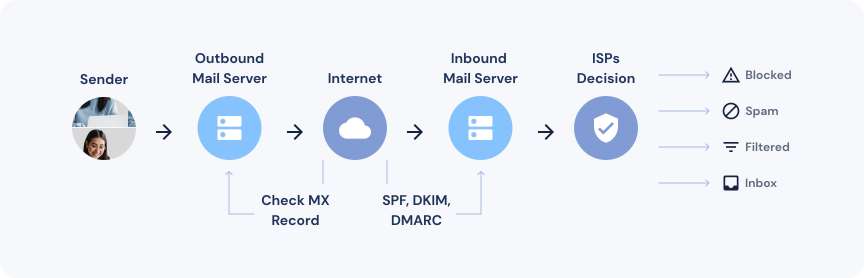
How to trace the root cause
Identifying that there’s a problem is one thing, but figuring out why it’s happening is another. To diagnose effectively, walk through these four lenses: when, where, what, and who.
1. When did the problem start?
- Was it sudden or gradual?
- Did it coincide with a new campaign, DNS change, or audience shift?
- Check send history, volume spikes, and ESP platform changes
2. Where is the problem happening?
- Is it affecting all inbox providers or just one?
- Compare open and click rates to see how different providers are ranking
- Check bounce types—policy blocks are especially telling
3. What changed?
- Audience: Did you introduce new or cold segments?
- Content: Any spammy language, broken links, or new templates?
- Infrastructure: Were any domain, DNS, or authentication updates made?
4. How is your audience behaving?
- Rising spam complaints (over 0.03%)?
- Higher unsubscribe rates?
- Engagement drop from previously active subscribers?
The more precisely you can answer these questions, the faster you'll get back on track.
Recovery steps to stabilize performance
Once you know the cause, the next step is stabilizing your email program. That means being deliberate, not reactive. Here’s a playbook you can follow:
Step 1: Suppress unengaged users Trim your list to reduce risk. By focusing on active, recently engaged subscribers, you can reset your sender reputation more quickly.
Step 2: Throttle your sending Slow your sending volume temporarily, especially if engagement rates are low. A controlled pace lets mailbox providers rebuild trust in your messages.
Step 3: Re-verify authentication records Check your SPF, DKIM, and DMARC records carefully. Even small misalignments can hurt you. Look for “spf=fail” or “dkim=fail” in headers, confirm DMARC alignment, and run follow-up tests after DNS changes.
Step 4: Stop experimenting (for now) Don’t try to fix everything at once. Make one change at a time, then measure the impact before moving on.
Step 5: Open a support ticket If problems persist, share your findings with your ESP. Provide a timeline, metrics, and a summary of troubleshooting steps to help them escalate efficiently.
Don’t just fix it, prevent the next issue
Solving one deliverability issue is important, but preventing the next one is where you’ll see long-term gains. Prevention starts with a debrief: document what went wrong, what you changed, and what worked. From there, update your policies to include clear rules for sunsetting inactive users and re-engagement. Smarter segmentation also plays a big role—prioritizing behavioral signals over static demographics keeps your list healthier.
Technical upkeep is another layer of prevention. Schedule monthly inbox placement and DNS record audits to make sure your foundation stays strong. Globally, deliverability averages about 84%, but in some regions like Canada, it trends higher at 90%. Monitoring these benchmarks helps you understand if you’re lagging behind.
It’s also worth distinguishing between transactional and marketing messages. Transactional failures—like order confirmations or password resets—often lead to immediate complaints, while marketing email failures tend to surface gradually through declining engagement. Address both, but prioritize urgent transactional fixes first.
Finally, make prevention a team effort. Marketing should manage list hygiene and segmentation, IT should track authentication health, and customer support should report deliverability-related complaints. Add inbox placement testing with seed lists to catch problems before they hit your real audience, and you’ll create a proactive system that reduces future risks.
Deliverability discipline
Deliverability isn’t just a technical issue. It’s a discipline—and one that can be your secret weapon if you stay observant and proactive. Spot the signs early, act surgically, and build smarter habits across your team.
The inbox is a privilege. Treat it that way, and it’ll reward you.
Want to go deeper?
If you’re ready to strengthen your email strategy, explore Delivra’s deliverability resources for more hands-on guidance. You’ll learn how to protect your sender reputation, improve reporting clarity, and build safeguards that keep your emails where they belong: the inbox.